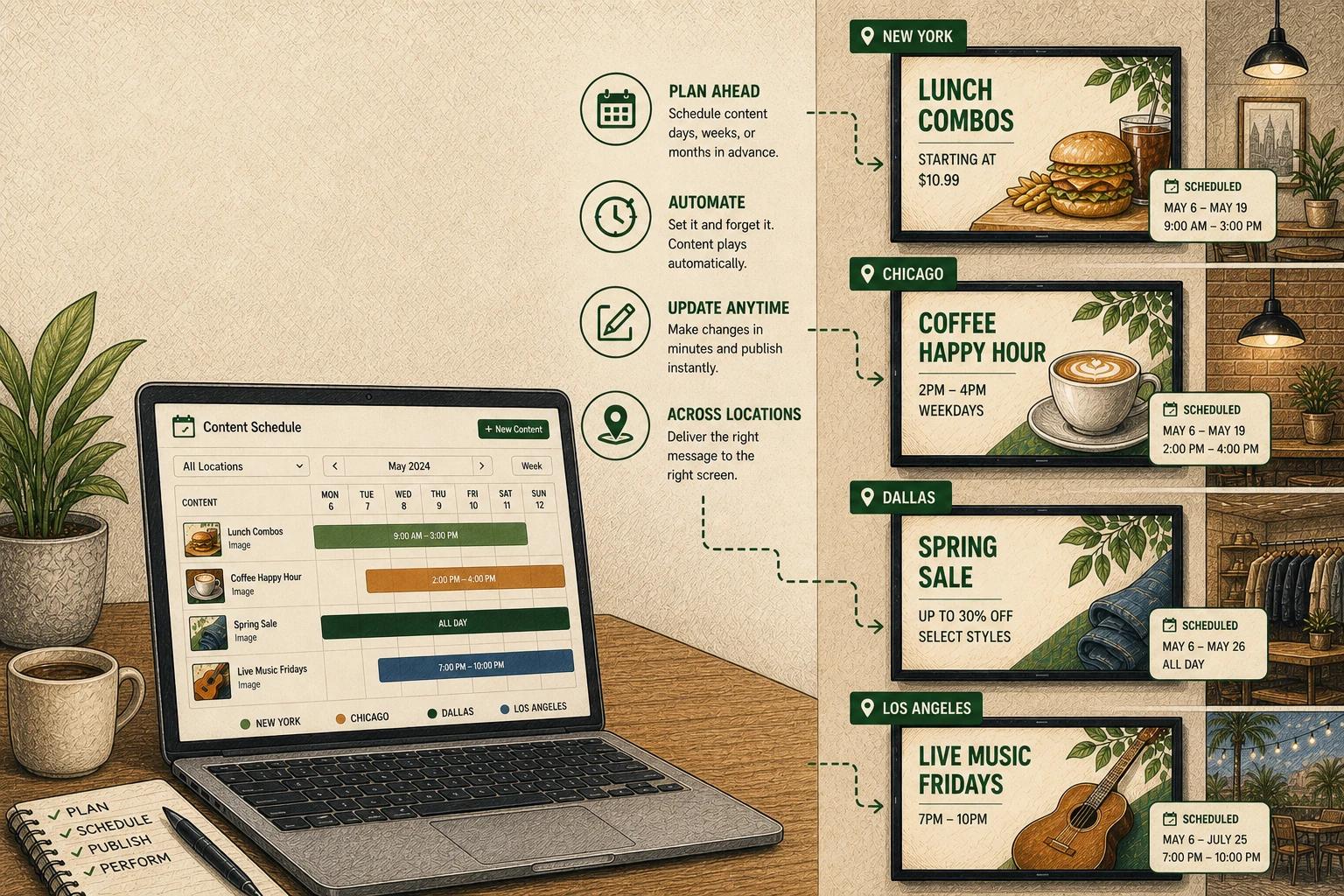
A lobby screen showing last month’s promotion is not a design problem. It’s a scheduling problem.
That is why digital signage content scheduling matters so much. When screen content is planned well, displays stay relevant without constant manual updates. Promotions start on time, menus change when they should, school announcements rotate automatically, and each location gets the right message at the right moment.
For most organizations, scheduling is the difference between having screens and actually running a useful signage program. The goal is not to create more content. It is to make sure the content you already have appears where it should, when it should, and for as long as it should.
What digital signage content scheduling actually does
At a basic level, scheduling tells a screen what to show and when to show it. That sounds simple, but the real value is operational. Scheduling turns digital signage from a static display into an active communication system.
A retailer might schedule breakfast offers until 10:30 a.m., lunch promos until 2:00 p.m., and loyalty messages in slower afternoon hours. A church may run different slides before service, during announcements, and after events. A school can automatically switch from campus news to emergency messaging or testing reminders depending on the time and day.
The key point is that timing shapes relevance. Even strong creative loses value if it appears too early, too late, or on the wrong screen.
Why manual updates break down
Many teams start with good intentions. They create attractive playlists, assign someone to update screens, and assume it will stay manageable. That usually works for one location and a few displays. Then things get messy.
Promotions are extended. Hours change for a holiday. One store needs a regional message while another does not. A menu board needs pricing updates. A front desk screen has different needs from a waiting room display. Suddenly, what seemed simple becomes a chain of exceptions.
Manual updates tend to fail in predictable ways. Content stays up too long, expired graphics keep running, staff forget to make changes, and different locations drift out of sync. None of this happens because teams do not care. It happens because the process depends too heavily on memory and extra effort.
Scheduling removes that friction. It replaces reminders and workarounds with planned automation.
A practical approach to digital signage content scheduling
The best digital signage content scheduling setups are not the most complex. They are the easiest to maintain.
Start by thinking in recurring patterns rather than one-off uploads. Most organizations have repeatable content rhythms: weekday business hours, weekend events, lunch rushes, seasonal campaigns, or monthly reminders. If you build schedules around those patterns, your screens require less day-to-day attention.
Next, separate content by purpose. Promotional content, operational notices, branded visuals, event messaging, and urgent updates should not all live in one catch-all playlist. When content is organized by role, scheduling becomes clearer and faster. It also reduces mistakes because teams are editing a focused set of assets instead of sorting through everything at once.
Then decide what should happen automatically and what should stay flexible. Some content is ideal for advance scheduling, like holiday hours, recurring menus, or campaign launches. Other content benefits from lighter control, such as quick announcements or location-specific updates. A good system gives you both structure and room to adjust.
Build schedules around audience context
One of the biggest missed opportunities in digital signage is treating all viewing moments the same. People do not interact with screens the same way at 8:00 a.m. as they do at 5:00 p.m., and they do not need the same information in every part of a building.
That is why good scheduling starts with context. Consider who is in front of the screen, what they need in that moment, and how much time they are likely to spend looking at it.
In a restaurant, menu board scheduling may follow demand windows. In healthcare, waiting room screens may balance educational content, service information, and reassurance throughout the day. In schools, hallway displays may focus on general awareness between classes, while office screens prioritize visitor instructions and administrative updates.
This is where scheduling becomes more than automation. It becomes a way to match messaging to real-world behavior.
Time-based scheduling is only the beginning
Most teams think of scheduling as date and time controls, and that is the foundation. But strong screen management often layers in additional logic.
Dayparting is one common example. You are not just choosing dates. You are programming distinct content blocks for morning, midday, evening, or weekend traffic. That matters in environments where audience needs shift predictably.
Location-based scheduling is equally important for multi-site organizations. A corporate campaign may run systemwide, while certain promotions, announcements, or service details vary by branch, campus, or region. Central control matters, but local relevance matters too.
Priority-based scheduling is another practical layer. Emergency notices, service disruptions, or urgent announcements should be able to override standard playlists. If a system cannot adapt quickly when circumstances change, its schedule is too rigid.
Common mistakes that weaken screen performance
The most common scheduling issue is overloading the playlist. Teams assume more content equals more value, but crowded rotations usually reduce visibility. If a key message appears too infrequently, most viewers will miss it.
Another problem is scheduling without ownership. If nobody is clearly responsible for reviewing what goes live and when it expires, outdated content will eventually slip through. Automation helps, but it still needs a simple governance process behind it.
There is also the temptation to over-engineer. Detailed schedules can be useful, but too many exceptions create maintenance headaches. If your setup requires constant tinkering, it will not scale well across locations or teams.
A better approach is to keep the framework simple, then use targeted adjustments only where they clearly improve relevance.
How to make scheduling easier across multiple locations
Multi-location organizations need consistency, but not at the expense of flexibility. This is where many legacy signage workflows become frustrating. They are either too centralized, making local changes difficult, or too loose, making brand control difficult.
A better model uses shared templates, standardized content categories, and schedule rules that can be reused. Corporate teams can manage brand campaigns and recurring systemwide content, while local operators handle approved updates for their own screens.
This balance is especially useful for franchises, regional healthcare groups, school systems, and church networks. They often need one source of truth while still recognizing that each site has different hours, events, or audience needs.
When the platform is intuitive, scheduling becomes a normal operational task rather than a specialized technical project. That is a big part of what teams are really looking for.
Measuring whether your schedule is working
A schedule is not effective just because it runs on time. It is effective when it improves communication and reduces effort.
That means asking practical questions. Are promotions appearing during the periods that drive response? Are expired messages disappearing without manual cleanup? Are teams spending less time updating screens? Are locations staying consistent without constant oversight?
In some environments, success may show up in sales lift, event attendance, reduced front-desk questions, or better campaign execution. In others, the win is simpler: fewer missed updates and less operational friction.
That trade-off matters. A highly customized schedule might look impressive on paper, but if it creates too much complexity for the team managing it, the long-term value drops.
Where scheduling is heading
Digital signage content scheduling is moving toward lighter management, not heavier management. Teams want more automation, but they also want more confidence that the right content will run without babysitting the system.
That shift is changing what businesses expect from signage software. They are not just looking for calendar controls. They want tools that make recurring content easy to organize, location rules easy to apply, and updates easy to push without a long learning curve.
There is also growing interest in smarter triggers and assisted workflows. As platforms become more capable, scheduling can move closer to self-managing displays that adapt to known patterns, predefined rules, and connected data sources. The appeal is obvious, but the value still depends on clarity. Automation works best when the underlying structure is simple enough to trust.
For many organizations, that is the real opportunity. Not more screens. Not more content. Just a better system for making sure the right message shows up at the right time with less manual work. HipDeck fits well in that direction because it keeps screen management approachable while giving teams enough control to stay precise.
If your screens are doing their job, people rarely notice the scheduling behind them. They just see information that feels current, useful, and well-timed. That quiet reliability is usually the clearest sign the system is working.